Challenge: Can you get the flag? Reverse engineer this binary.
Hint: What is UPX?
Initial Research
The challenge hint points toward UPX (Ultimate Packer for eXecutables). UPX is a free, open-source tool used to pack (compress) and decompress executable files. Before we can analyze the binary logic, we need to unpack it.
If you don't have it installed, you can get it via apt:
$ sudo apt install upx
You can learn more about the technical details at the official site: upx.github.io
Step 1: Decompressing the Binary
First, we need to restore the packed executable to its original state using the -d (decompress) flag.
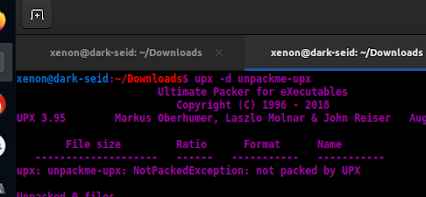
Terminal: Running upx -d on the binary
Step 2: Disassembly
Now that the binary is unpacked, we can disassemble or decompile it. For this challenge, I used Radare2 to analyze the assembly code.
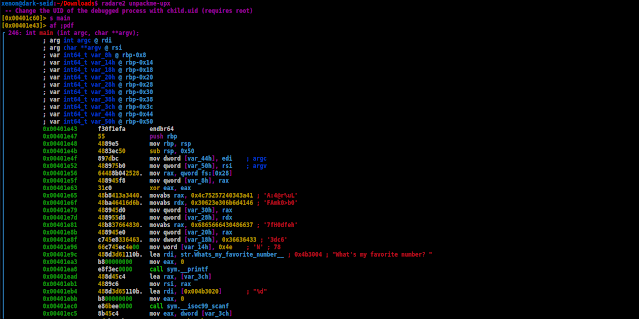
Analyzing the main function in Radare2
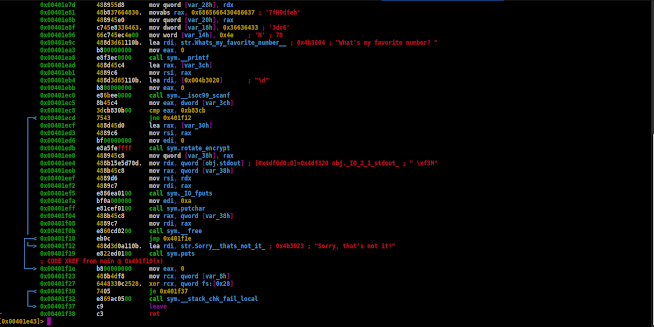
Analyzing the main function in Radare2
Looking at the disassembled code, we can identify three critical points:
- 0x00401e9c: The program prints a prompt asking for my "favorite number."
- 0x00401ec0: It takes user input using the
scanffunction. - 0x00401ec8: The program compares our input integer against the hex value
0xb83cb.
Step 3: Finding the Flag
We need to convert that hex value (0xb83cb) into a decimal integer to provide the correct input.
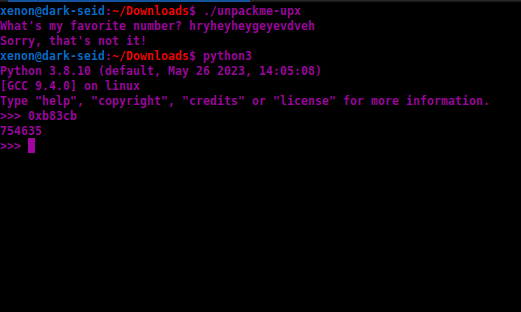
Converting 0xb83cb to Decimal
After converting, we get the decimal value. When we run the program and enter this integer as input, it provides the flag.
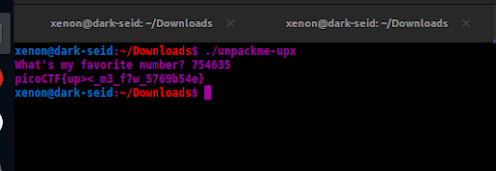
Success: The program prints the flag
Conclusion
This challenge is an excellent introduction to how binary packing works. It demonstrates that while compression makes a file smaller and harder to read initially, a simple upx -d command is often all it takes to start a deep-dive analysis.